Image of the day

Captured by
Michael Scherman

Dual Clusters near Antares

My Account

New to Astromart?

Register an account...

Need Help?

advice

Started by jomeara, 10/22/2008 04:06AM
Posted 10/22/2008 04:06AM Opening Post
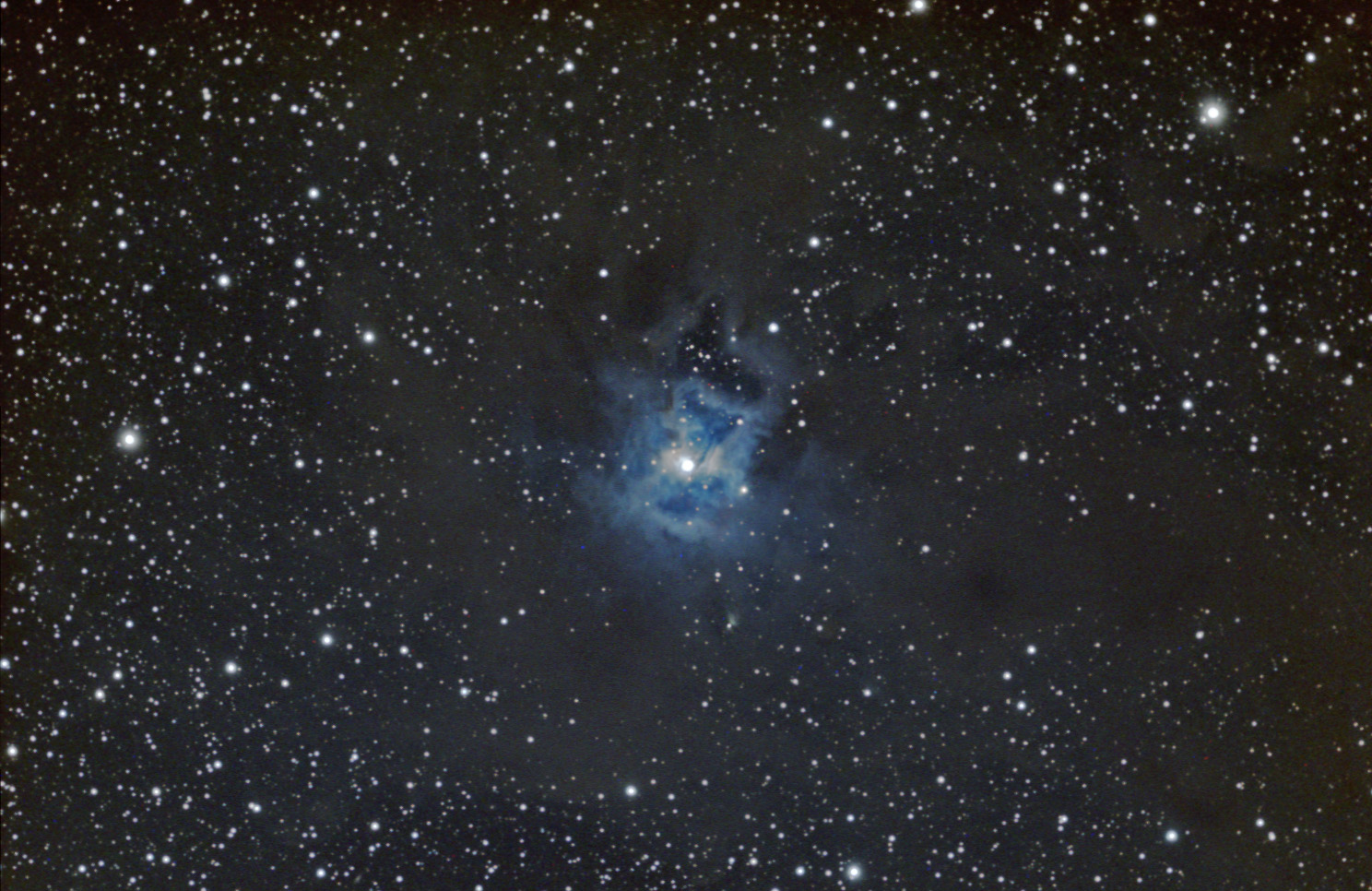
Hi all, this is my first post in this forum although I have been enjoying your work for a while. Constructive critism of this image would be welcome. I have alot of trouble trying to get colour in my stars. It is 5 hours of 15 minute subs (full moon, very average seeing) through an NP-101 with a sbig st-2000xcm (one shot colour). I have posted my usual work-flow in Neils forum. Any advice or suggestions would be most appreciated.
cheers,
Jeff

Attached Image:

jomeara's attachment for post 44281
Posted 10/22/2008 05:57AM #1
Shorter exposures. I know this works with DSLRs.

Joe

Posted 10/22/2008 06:07AM #2
I would also say try more shorter exposures stacked, so the stars do not burn out the color.

[SIZE="Large"][/SIZE][COLOR="Blue"][/COLOR] Floyd Blue grin
Amateur Imager
Posted 10/22/2008 03:52PM | Edited 10/22/2008 04:01PM #3
jeff OMeara said:...... I have alot of trouble trying to get colour in my stars. Any advice or suggestions would be most appreciated.
Hi Jeff,
Neal gave you good advice when he suggested longer subexposures. As a general rule, lots of white stars in an image would suggest star saturation. As you can see from what others have done:
http://www.robgendlerastropics.com/NGC7023NM.html
http://www.tvdavisastropics.com/astroimages-1_00000f.htm
there isn't a lot of color in the surrounding stars. Shortening the exposures won't gain you star color and it will only increase the 'noise' in the rest of the image.
The graininess in the outer portion of the nebula would also suggest longer exposures .
When you are faced with an area that has both colored stars and faint areas, take two sets of exposures. A short set that captures the stars without saturating, and a longer set that gets good S/N on the faint stuff. Then just layer and paste the colored stars onto the longer master.
Someone also suggested using a sigma combine (or something similar) to get rid of your outliers. That is good advice, too. CCDStack has the most sophisticated data rejection routines that I have found, but even a simple sigma will work well (assuming > 8 subs).

dan

P.S.
I almost forgot one of the most important points.
Don't touch the white point as you did. That will certainly make stars whiter. The only thing that I would do with a levels adjustment is set the black point. The midpoint slider is kind of a heavy handed adjustment. You have much better control of things by using a curves adjustment.
Posted 10/22/2008 06:54PM #4
Jeff,
The image is very nice. I think Dan's advice may be spot on. Don't ever touch the white point. If you adjust the white point to bring out detail, you will lose star color. It is generally best to leave it completely alone.

I am interested in your workflow.... what is Neils forum?

Cheers,
Tyler

"The expression of the beautiful is in direct ratio to the power of perception acquired by the artist." (Gustave Courbet)
Posted 10/22/2008 06:56PM #5
Hi Joe, Floyd, David and Dan,

Thanks alot for your responses, I will try out some of your suggestions. I just completed my dome and automated it with Lesvedome, so I should be able to get more data (if the skies ever clear up).

clearskies,

Jeff